Last updated: 05/2026| Verified against ph.iherb.com official payment methods
Most older blog posts about iHerb Philippines tell you that GCash isn’t supported — that you need a credit card or PayPal to complete checkout. That information is outdated. As of 2026, GCash IS officially supported on iHerb Philippines through the Alipay+ Partner network, which appears directly on iHerb’s checkout page as a payment option.
This is genuinely good news for the millions of Filipino consumers who shop without a credit card. You no longer need to set up PayPal, apply for a virtual debit card, or jump through workarounds. Your regular GCash wallet works directly on iHerb checkout — same way you pay for Shopee or Lazada.
This guide walks through the complete payment flow step-by-step, covers what to do if payment fails, explains GCash daily and monthly limits relative to iHerb order sizes, and includes alternatives if GCash isn’t your preferred option.
Quick answer: Yes, GCash works on iHerb Philippines. Select GCash via the Alipay+ option at checkout, scan the QR code with your GCash app, confirm payment in the app, and you’re done. Total time: under 2 minutes. No credit card or PayPal account needed.
Quick Verdict: Yes, GCash Works on iHerb
GCash is officially listed as a supported payment method on iHerb’s Philippine payment page (ph.iherb.com/shipping). The integration runs through Alipay+ Partner — a global payment network that connects e-wallets across Asia to international merchants. iHerb is one of the major international retailers that has integrated Alipay+ acceptance.
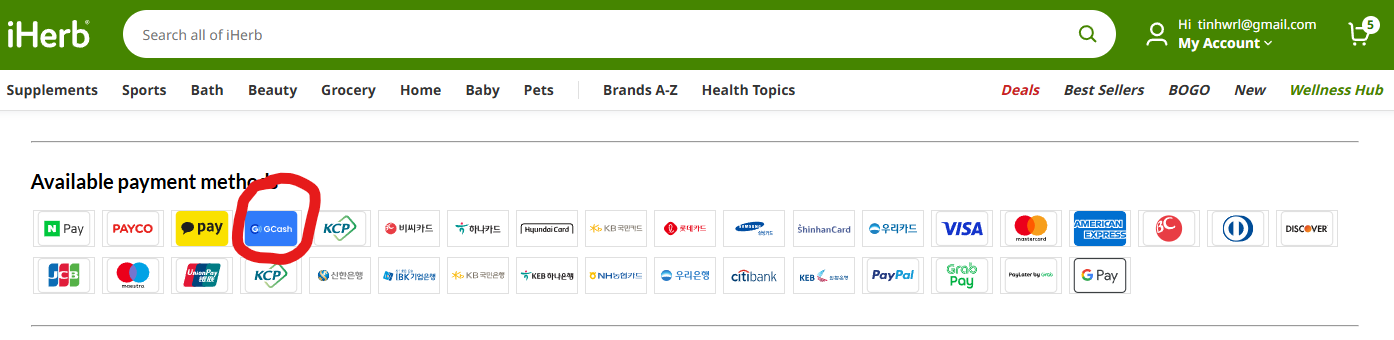
Confirmed facts (verified May 2026):
- GCash logo appears on iHerb Philippines official payment options page
- Integration runs through Alipay+ Partner network (visible at checkout)
- Works for both first-time and repeat customers
- Payment is direct from GCash wallet balance — no card needed
- Confirmation is instant; iHerb processes order within hours
Step-by-Step Guide: Paying iHerb with GCash
The entire flow takes under 2 minutes once you’ve added items to your cart. Here’s exactly what to do, step by step:
Before you start
- Active GCash account with sufficient wallet balance to cover your order total
- Your GCash account verified at full-KYC level (basic verified is usually sufficient)
- Smartphone with GCash app installed and logged in
- Internet connection on both desktop/laptop (for iHerb) and phone (for GCash)
The payment flow
The entire flow takes under 2 minutes once you’ve added items to your cart. Here’s exactly what to do, step by step:
Add products to your iHerb cart at ph.iherb.com.
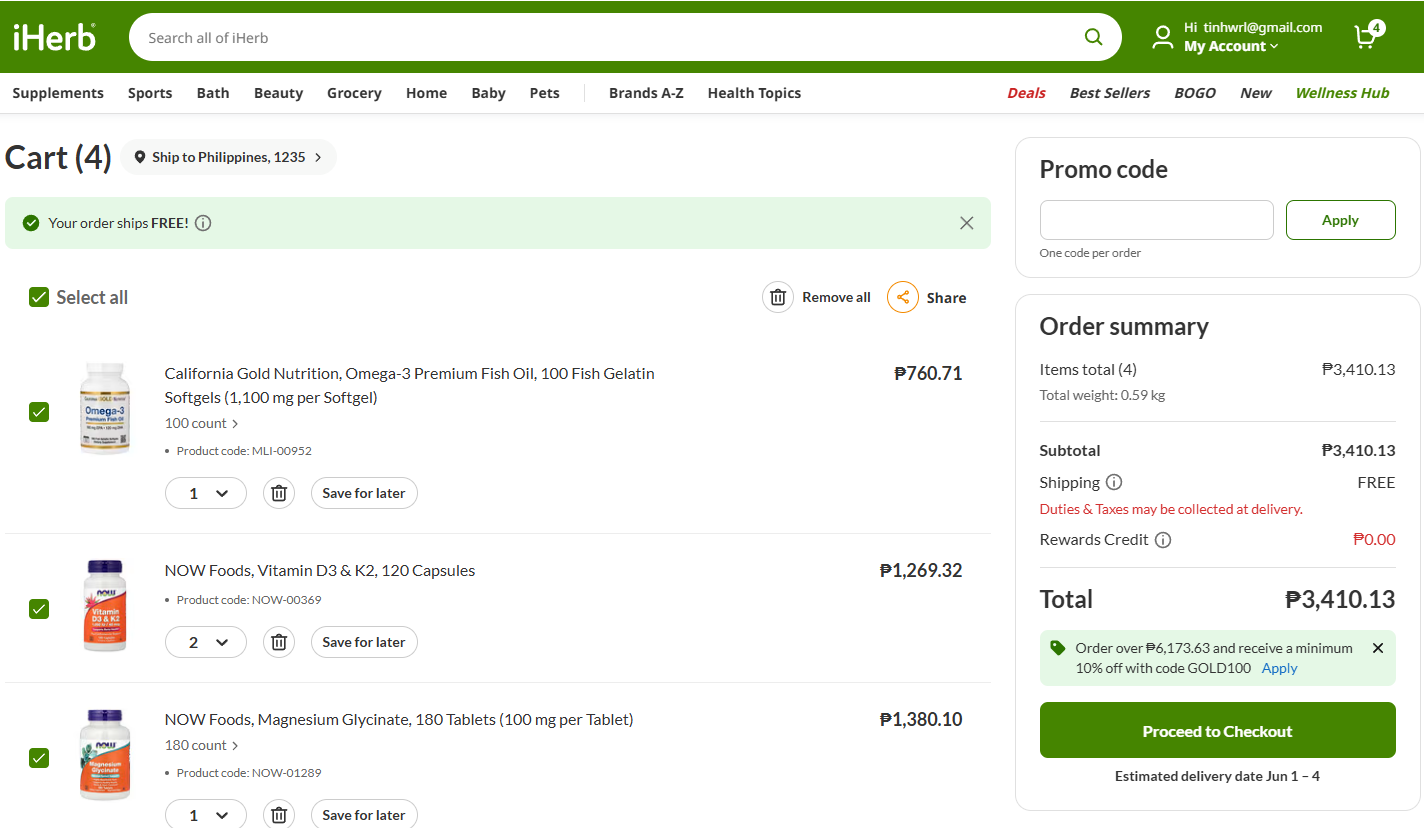
Click ‘Proceed to checkout’ when ready.
Apply your discount code
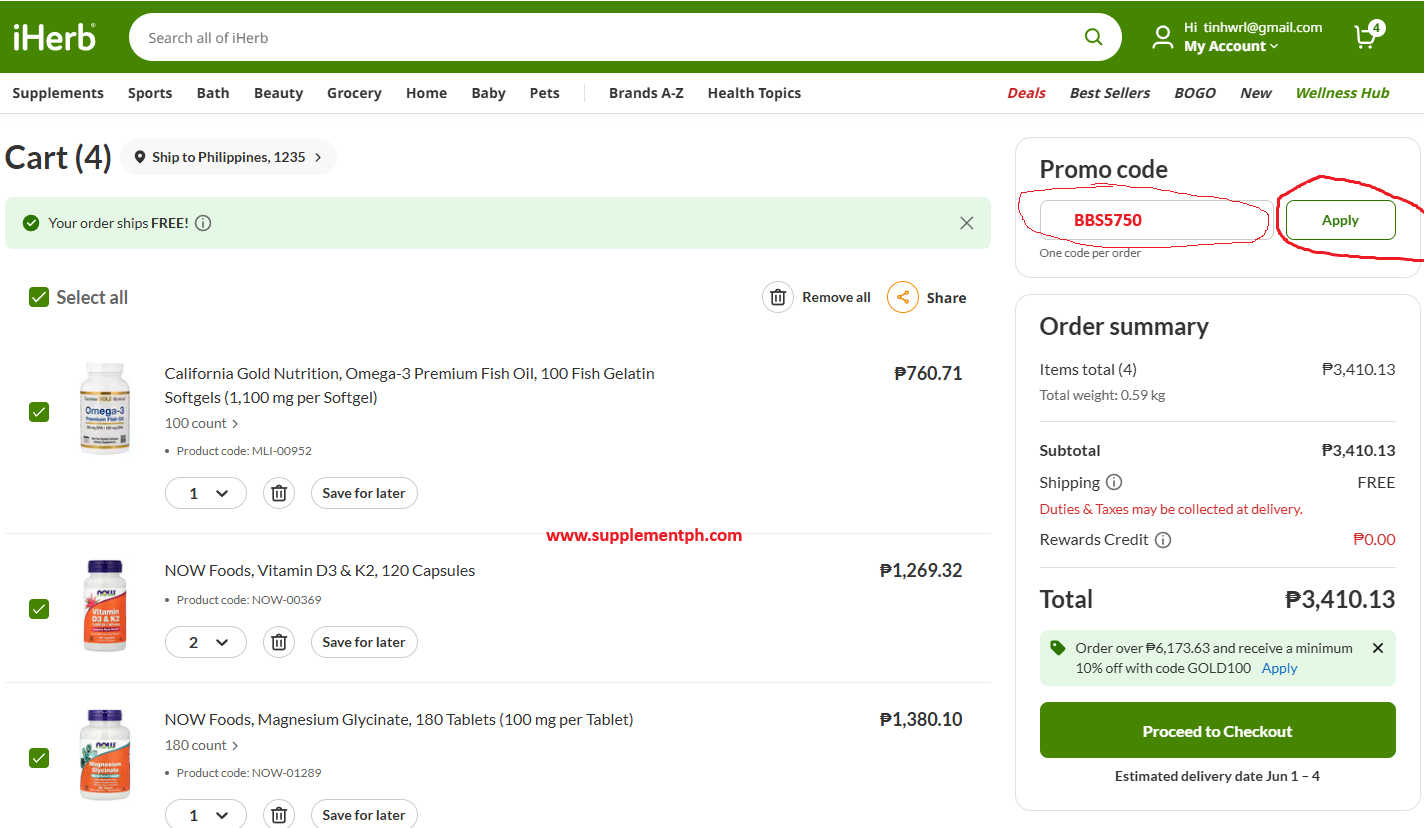
Apply your discount code BBS5750 in the discount field to claim your welcome discount, then click ‘Apply.’
Confirm your shipping address
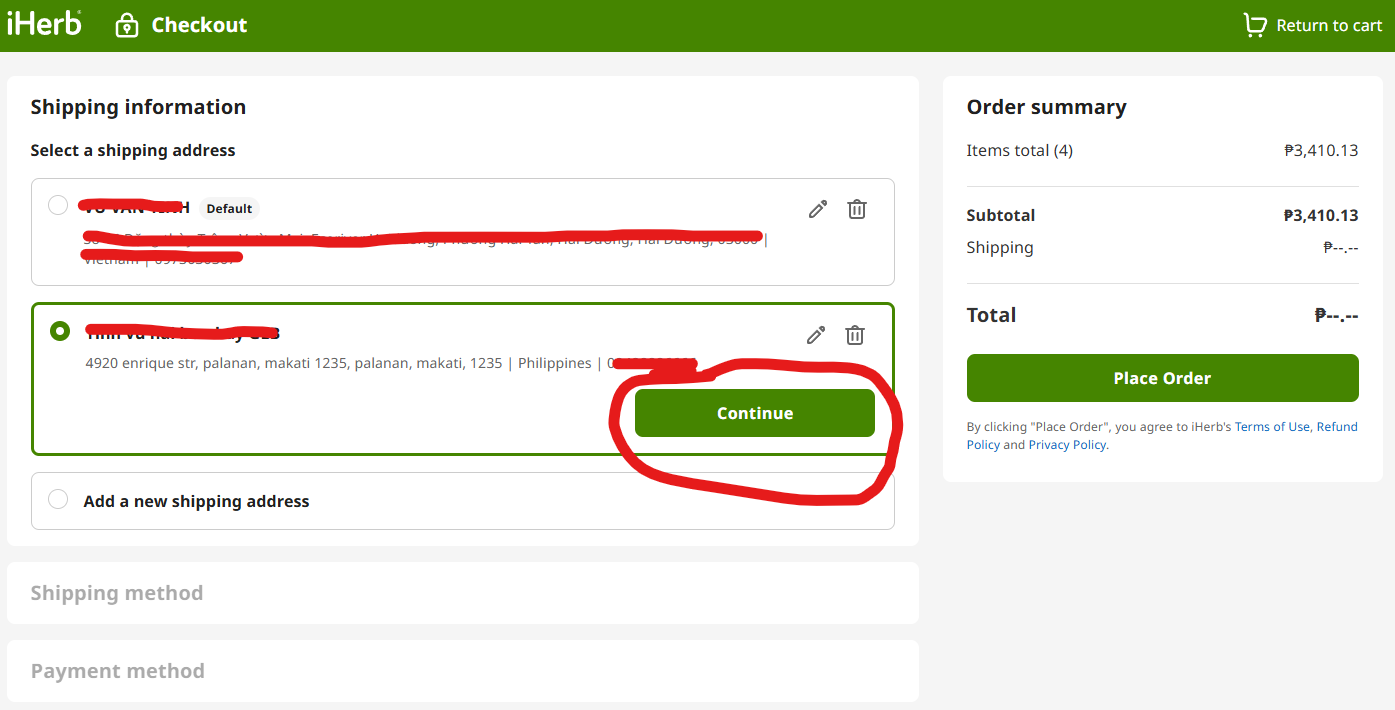
Confirm your shipping address (Philippines selected, complete address entered).
Select your shipping method.
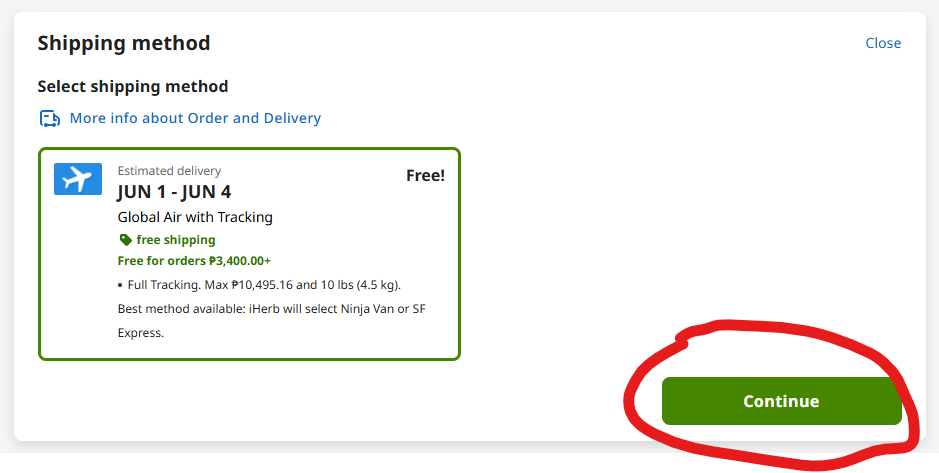
For most orders, ‘Global Air with Tracking’ is the only available option (delivered via Ninja Van or SF Express).
On the payment selection screen
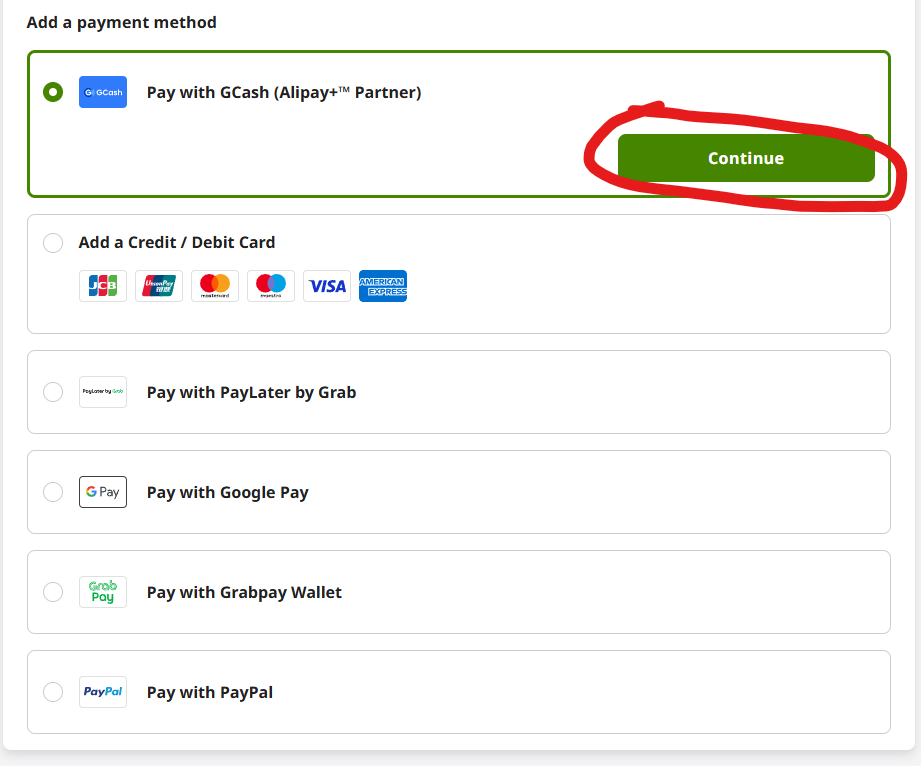
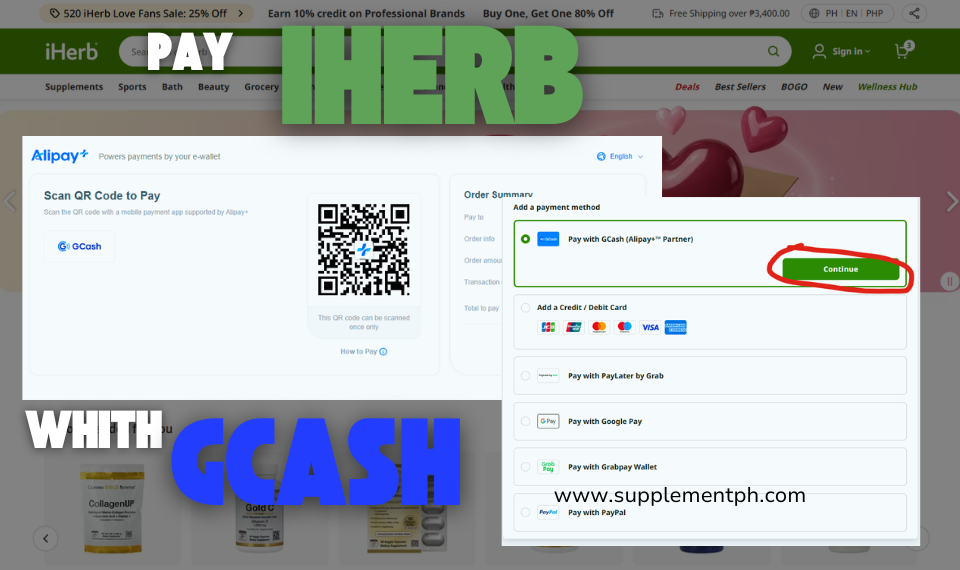
On the payment selection screen, scroll through available payment methods. Look for the GCash logo (under the ‘Alipay+ Partner’ grouping). Click to select it.
Click ‘Place order.’
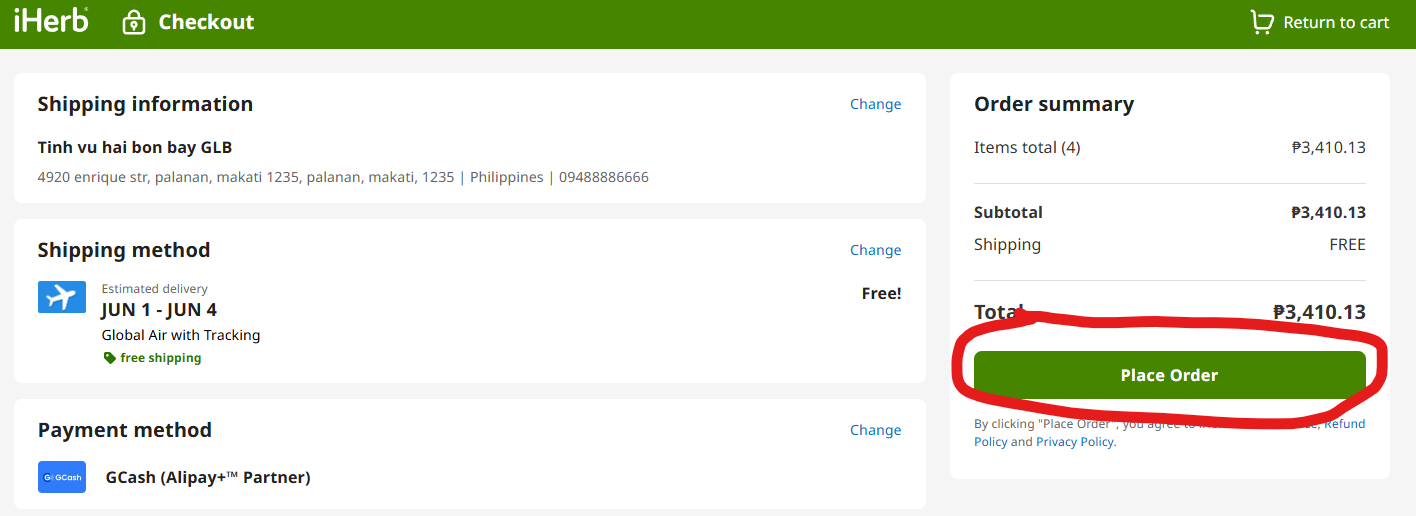
iHerb will redirect you to a secure Alipay+ payment page showing a QR code.
Scan the QR code
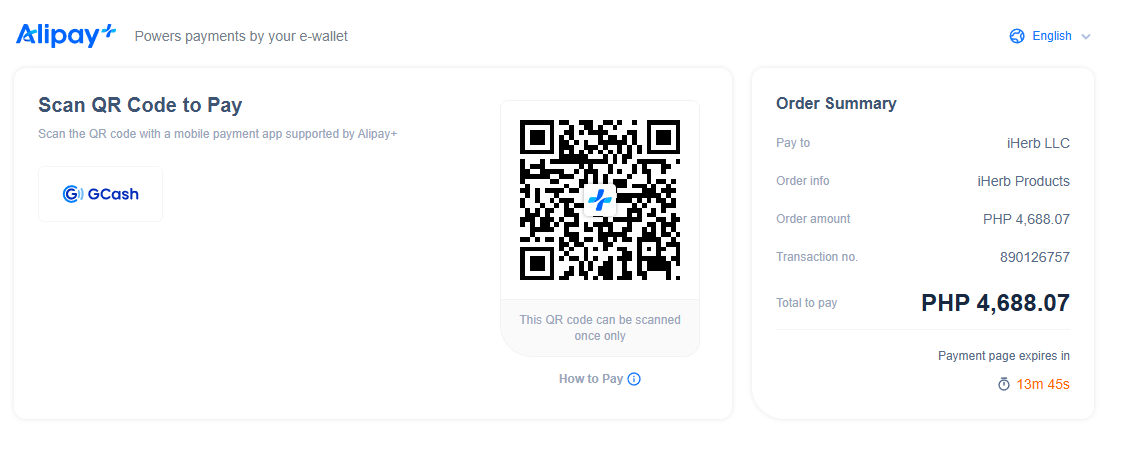
Scan the QR code displayed on your computer/phone screen
Confirm the payment amount in your GCash app
verify it matches your iHerb cart total (including shipping if applicable).
Enter your GCash MPIN to authorize the payment.
Enter your GCash MPIN.
Enter your GCash MPIN to authorize the payment
Wait 10-30 seconds for confirmation.
The iHerb page will automatically refresh showing ‘Order confirmed’ once the payment processes.
Save the order confirmation email iHerb sends within minutes.
This contains your order number and tracking link.
Pro tip: If you’re checking out on your mobile phone (not desktop), the GCash flow is even simpler. Instead of scanning a QR code, iHerb’s Alipay+ integration will detect you’re on mobile and open the GCash app directly. Just confirm and enter your MPIN.
Currency conversion
iHerb displays prices in Philippine pesos throughout the shopping experience, but the actual transaction processes in USD internally. GCash handles the conversion at the time of payment using the prevailing exchange rate from their banking partner. The PHP amount you see at checkout is what GCash will deduct from your wallet — no surprise charges.
What Is Alipay+ Partner (Why GCash Works)
Alipay+ is a cross-border payment platform launched by Alibaba’s Ant Group. It connects regional e-wallets across Asia (GCash in Philippines, KakaoPay in Korea, AlipayHK in Hong Kong, TrueMoney in Thailand, etc.) to international merchants. Think of it as a bridge: GCash isn’t a global payment network on its own, but through Alipay+, it can pay merchants that wouldn’t normally accept GCash directly.
iHerb integrated Alipay+ acceptance several years ago to serve Asian customers without major credit card adoption. When you select ‘GCash via Alipay+’ at iHerb checkout, the transaction flows: GCash wallet → Alipay+ → iHerb’s payment processor. The complexity is invisible to you — you just scan a QR code and confirm.
Other Alipay+ Partner wallets on iHerb
iHerb also accepts these e-wallets via the same Alipay+ Partner network:
- Kakao Pay (South Korea)
- AlipayHK (Hong Kong)
- TrueMoney (Thailand)
- Touch ‘n Go eWallet (Malaysia)
- Mainland China Alipay (the original)
This is useful context if you’re a Filipino abroad — you can still use GCash from outside the Philippines, or use local e-wallets if you’re traveling.
GCash Limits vs iHerb Order Sizes
GCash has daily and monthly transaction limits that depend on your verification level. Understanding these helps you size your iHerb orders correctly.
| GCash Verification Level | Daily Limit | Monthly Limit |
| Basic verified | ₱100,000 | ₱100,000 |
| Fully verified (KYC complete) | ₱500,000 | ₱500,000 |
| GCash Plus/Premium | ₱1,000,000+ | ₱2,000,000+ |
(Note: GCash limits are subject to change. Verify current limits in your GCash app under Profile → Limits.)
Since iHerb’s maximum order value is $170 USD (~₱10,000), even Basic Verified GCash users have more than enough daily limit headroom. The only practical limit consideration is if you’ve already used your daily GCash for Shopee, electricity, or other transactions before checking out on iHerb.
GCash fees for iHerb payment
GCash does not charge a transaction fee for Alipay+ payments to international merchants. The amount deducted from your wallet equals the converted PHP value of your iHerb cart, no markup. The only potential cost is the FX margin — GCash uses the prevailing exchange rate from their banking partner, which may be slightly less favorable than the mid-market rate. Typical FX margin is 1-2%, similar to credit card foreign transaction fees but without any explicit fee line.
Common Problems and Troubleshooting
Problem 1: GCash option doesn’t appear at checkout
Causes and fixes:
- Confirm your delivery address is set to Philippines. iHerb shows different payment methods per country — GCash only appears for PH delivery.
- Refresh the checkout page. Browser caching occasionally hides newer payment methods.
- Clear your iHerb session and log out/in. This refreshes available payment options.
- Try a different browser (Chrome usually works most reliably with Alipay+ integration).
Problem 2: QR code scan fails
Solutions:
- Ensure your GCash app is updated to the latest version (App Store / Play Store)
- Verify your phone camera has focus on the QR code — distance ~6-12 inches works best
- If on mobile both screens (laptop + phone): use the screenshot method instead — screenshot the QR, open GCash → Scan QR → Upload from gallery
- Try desktop view on laptop with phone scanning separately — most reliable combination
Problem 3: Payment confirmed in GCash but iHerb order doesn’t appear
Wait 5-10 minutes for sync. If still pending:
- Check your iHerb account → My Orders. Pending payments sometimes show as ‘Processing’
- Check your email for iHerb confirmation. The order email is the source of truth.
- If 30+ minutes pass with no email, contact iHerb support via Help Center (secure.iherb.com/info/Contact). Have your GCash transaction ID ready (visible in GCash app → Transaction History).
- iHerb typically resolves these payment sync issues within 24 hours — either confirming order or refunding GCash transaction.
Problem 4: Insufficient GCash balance
Top up before retrying:
- Cash in via 7-Eleven, Bayad Center, or any GCash partner outlet (instant)
- Bank transfer from BPI, BDO, Metrobank, UnionBank, or other supported banks (5-30 minutes)
- PayPal to GCash (24-48 hours)
- Cash in via SM/Robinsons supermarket (instant)
Problem 5: ‘Payment authorization failed’ error
Common causes:
- Your GCash account hit daily transaction limit — wait until midnight or upgrade verification
- Your GCash account is temporarily restricted (suspicious activity flag) — contact GCash support to lift
- Cart total fluctuated mid-checkout due to currency exchange refresh — start over with current price
GCash vs Other iHerb Payment Methods
| Method | Pros | Cons |
| GCash via Alipay+ | No credit card needed; instant; familiar to Filipinos; no annual fees | Daily/monthly GCash limits apply; FX margin built into rate |
| Credit card (Visa/Mastercard/Amex/JCB) | Highest order limits; rewards points; chargeback protection | Requires credit card application; FX fees may apply |
| Debit card (BPI/BDO/Metrobank/etc.) | Direct from bank; no credit needed; chargeback protection on most banks | Foreign transaction fees vary by bank (~1-3%) |
| PayPal | Buyer protection; can link multiple funding sources | Requires PayPal account setup; not as instant as GCash |
| GCash Mastercard (virtual card) | Acts as a regular Mastercard for any online merchant | Requires GCash + virtual card creation step |
| iHerb Gift Card | Pre-paid, no card needed for repeat purchases | Must initially buy gift card with another method |
Which to choose?
- Don’t have credit card: GCash via Alipay+ is the simplest path
- Want rewards/cashback: Credit card with international fee waiver (HSBC, Citibank, BPI Amore)
- Frequent international shopping: PayPal for buyer protection across all merchants
- Want to use GCash but checkout has issue: Create GCash Mastercard virtual card and use as a regular Mastercard
Security and Fraud Protection
Both iHerb and GCash use bank-grade security for payments. The Alipay+ Partner integration adds another layer of separation — iHerb never sees your GCash credentials, MPIN, or wallet balance. Alipay+ handles authentication on your phone (the only place your MPIN is entered).
iHerb’s security measures
- PCI-DSS compliance for all payment processing
- SSL encryption (look for https:// + padlock in browser)
- Order confirmation emails sent to verified email only
- Suspicious activity flagged for manual review (e.g., shipping address change immediately after login)
GCash’s security measures
- MPIN required for every transaction over ₱1,000
- Face ID/fingerprint biometric option for added auth
- Transaction notifications via push + SMS (alerts you to unauthorized use)
- GCash Insurance for unauthorized transactions (file disputes via app)
Red flags to watch for
- Fake ‘iHerb Philippines’ Facebook pages asking for GCash payment to a personal account — these are scams. Real iHerb payments go through Alipay+, never to a personal GCash number.
- Phishing emails claiming ‘iHerb payment failed, send GCash to verify’ — iHerb never asks for additional GCash payment outside their own checkout flow
- Pop-ups during checkout asking for your GCash MPIN — legitimate Alipay+ never asks for MPIN in iHerb’s webpage. MPIN is only entered in the GCash app itself
Golden rule: your GCash MPIN is entered ONLY in the GCash app on your phone, NEVER on any other website or pop-up. If a checkout page asks for your MPIN, it’s fraudulent — close the page immediately.
What to Do If Payment Fails
Step 1: Check the failure type
iHerb will display an error message. Common types:
- ‘Insufficient balance’ — top up GCash and retry
- ‘Authorization failed’ — limit reached or account restricted; contact GCash support
- ‘Payment timeout’ — confirmation took too long; restart checkout
- ‘Currency conversion error’ — rare; refresh page and retry
Step 2: Verify on GCash side
Open GCash app → Transaction History. Check if the transaction:
- Successfully deducted: payment processed in GCash but iHerb didn’t sync — contact iHerb with transaction reference number
- Pending: wait 10 minutes, then refresh both iHerb and GCash; usually resolves automatically
- Not in history: payment didn’t initiate; simply retry from iHerb checkout
- Marked ‘Refunded’: iHerb already reversed the transaction; safe to retry
Step 3: Contact iHerb if amount deducted but no order
If GCash deducted but iHerb shows no order:
- Go to ph.iherb.com → My Account → Help Center
- Click ‘Contact Us’ → Issue type: Payment Problem
- Provide: GCash transaction reference (16-digit code from GCash app), amount, date, and your email
- iHerb support responds within 24 hours and either creates the order manually or initiates GCash refund
- Refunds via GCash typically arrive within 3-5 business days
Alternative Payment Methods Without a Credit Card
If GCash isn’t available or you prefer another option, several alternatives don’t require a credit card:
Option 1: GCash Mastercard (virtual card)
Generate a virtual Mastercard from your GCash app. This card works on any website that accepts Mastercard, including iHerb. Useful when Alipay+ checkout has issues, or for repeat use across international sites.
- Open GCash app → tap ‘Show All’ from dashboard
- Find ‘GCash Mastercard’ or ‘Virtual Card’
- Generate virtual card (free)
- Use the 16-digit card number, expiry, CVV at iHerb checkout (Credit Card option, not Alipay+)
Option 2: Maya virtual card
Maya (formerly PayMaya) offers similar virtual card functionality. Works on iHerb as a regular credit/debit card, not through Alipay+.
Option 3: PayPal linked to GCash
Link your GCash to PayPal as a funding source. Fund PayPal balance from GCash, then use PayPal at iHerb checkout. Two-step process but adds PayPal buyer protection on top.
Option 4: Bank debit card
Most Philippine bank debit cards (BPI, BDO, Metrobank, Security Bank, UnionBank, RCBC) work for international online purchases when you’ve activated international transactions in your bank’s online banking. Foreign transaction fees vary by bank.
Option 5: iHerb Gift Card
iHerb sells gift cards purchasable with any payment method. After purchase, the gift card balance applies to future iHerb orders. Useful for receiving payment as a gift or pre-loading funds for consistent monthly spending.
Frequently Asked Questions
Is using GCash on iHerb safe?
Yes. The Alipay+ Partner integration is bank-grade secure. iHerb never sees your GCash credentials, your MPIN is entered only in the GCash app itself, and both companies are PCI-DSS compliant. The risk is no higher than using GCash for Shopee or Lazada.
Are there fees for paying iHerb with GCash?
GCash doesn’t charge a transaction fee. The only cost is the FX margin built into the exchange rate (typically 1-2%, similar to credit card foreign transaction fees). The amount you see on iHerb’s checkout in PHP is what GCash will deduct.
Can I use GCash with the iHerb mobile app?
Yes. The iHerb mobile app supports the same payment methods as the website. At checkout in the app, select ‘GCash via Alipay+’ and the integration will open or redirect to GCash for confirmation. The mobile-to-mobile flow is actually smoother than desktop because you don’t need to scan QR — both apps communicate directly.
Will my GCash payment show in my GCash transaction history?
Yes. The transaction appears as ‘Alipay+ Cross-border Payment’ with the merchant name (iHerb or Alipay+ Partner). Save the transaction reference for your records and potential dispute.
Can I split payment between GCash and another method?
Not in a single transaction. iHerb processes each checkout with one payment method. However, you can split by placing two separate smaller orders (one paid with GCash, one with another method). Just space the orders to avoid customs concerns about repeated shipments.
What if my GCash account is foreign (not Philippine)?
GCash is exclusively a Philippine e-wallet. If you’re a Filipino abroad with a Philippine-registered GCash, it still works. If you have a different country’s e-wallet (TrueMoney Thailand, KakaoPay Korea, etc.), those work too via the same Alipay+ network.
Why don’t I see GCash on iHerb’s US site?
GCash only appears for Philippine delivery addresses. The iHerb US site (iherb.com without /ph/) shows US-specific payment methods. To see GCash, ensure your delivery country is set to Philippines.
Can I get a refund to GCash if I return an iHerb product?
Yes. iHerb refunds go back to the original payment method. If you paid with GCash, the refund returns to your GCash wallet (via Alipay+ reversal). Timeline is typically 3-7 business days after iHerb approves the refund.
Is there a minimum or maximum amount to pay iHerb with GCash?
No iHerb-specific minimum. The maximum is constrained by GCash’s daily transaction limits (₱100,000 Basic verified, ₱500,000+ Fully verified) and iHerb’s per-order maximum ($170 USD ≈ ₱10,000). For normal orders, GCash limits are not a concern.
Can I save GCash as my default payment on iHerb?
iHerb’s account settings allow you to save preferred payment methods. After your first successful GCash payment via Alipay+, the option appears as ‘GCash (Alipay+ Partner)’ under your saved methods. Future checkouts pre-select this option for faster checkout.
What’s the difference between paying with GCash direct and GCash Mastercard?
GCash direct goes through Alipay+ Partner (treated as e-wallet payment). GCash Mastercard is a virtual card linked to your GCash balance (treated as a Mastercard credit/debit transaction). Both work; direct is simpler. Use Mastercard route only if Alipay+ has issues.
Will iHerb send me discounts or notifications via GCash?
No. iHerb’s promotional communications come via email only. GCash is purely a payment processor — no marketing data flows back. Subscribe to iHerb’s email newsletter for promo codes and sale alerts.
Final Thoughts: GCash Is the Best Option for Most Filipinos
If you’re a Filipino consumer without a credit card, GCash via Alipay+ is the simplest, fastest, and most familiar way to pay for iHerb. The integration is seamless, the security is bank-grade, and there’s no setup hassle beyond having an active GCash account (which most Filipinos already do).
If you’ve been holding off on iHerb shopping because you thought you needed a credit card or PayPal — you don’t. Open ph.iherb.com, add products to cart, select GCash at checkout, and you’re done. The entire process from registration to first order takes under 15 minutes for a brand new iHerb user.
Ready to place your first order? Use code BBS5750 at checkout for your welcome discount. Our complete shipping guide covers customs, delivery times, and FDA rules. Our best products guide helps you choose what to buy first.
—
Related Reading on supplementph.com
- iHerb Philippines Shipping Guide 2026.
- Is iHerb Legit? Honest Filipino Review.
- Best iHerb Products for Filipinos 2026.
- iHerb Customs and Duty Guide for Philippines.
- iHerb Promo Codes & Deals — Always Updated.
Sources
Payment methods verified against iHerb’s official Philippine payment and shipping policy page (ph.iherb.com/shipping/ph), accessed May 2026. GCash limits sourced from GCash official limits page. Alipay+ network details from antgroup.com/global-partner-network.
Affiliate Disclosure
This article contains affiliate links to iHerb. When you make a purchase through these links, supplementph.com may earn a small commission at no additional cost to you. Our payment method recommendations are based on actual functionality verified against official sources, not commission rates. GCash itself is not an affiliate of supplementph.com.