Placing your first order from iHerb to the Philippines can feel intimidating. International shipping, foreign payment methods, customs concerns, currency conversion – there’s a lot to figure out. But once you understand the process, ordering from iHerb is actually simpler than checkout on most local sites like Shopee or Lazada. This guide walks you through every step of your first iHerb order, from account creation to tracking your package as it arrives at your door.
Quick overview – 10 steps in 20 minutes: (1) Visit ph.iherb.com, (2) Create account with email, (3) Browse and add products to cart, (4) Aim for ₱3,400 free shipping threshold, (5) Choose Global Air with Tracking shipping, (6) Enter your Philippine delivery address, (7) Select payment method (GCash or credit card recommended), (8) Apply welcome code BSS5750 for first-order discount, (9) Review and confirm order, (10) Track via iHerb account or Ninja Van. Total delivery time: 7-14 business days to any Philippine address.
By the end of this guide, you’ll know exactly what to do at each checkout step, what payment methods work best for Filipinos, how to maximize savings with promotion codes, what to expect from delivery, and how to handle any issues that arise. We’ll use the actual iHerb interface at ph.iherb.com and reference real Philippine prices, shipping options, and delivery experiences.
Before You Start: What You’ll Need
Gather these things before placing your first order to make checkout smooth:
Required information
- Email address (will receive order confirmation and tracking)
- Philippine delivery address – complete with barangay and ZIP code
- Active Philippine mobile number (required for courier coordination)
- Payment method – GCash, credit/debit card (BPI, BDO, Metrobank, etc.), or PayPal
- Approximately 20 minutes of uninterrupted time for first-time setup
Useful to have ready
- List of supplements you want to buy (with specific brand/dose if known)
- Budget you’re willing to spend (recommend ₱3,500-5,000 for first order to hit free shipping)
- Affiliate or welcome code for additional discount
- Backup payment method in case primary is declined
Pro tip: Keep your phone nearby during checkout. iHerb may send OTP verification codes via SMS for payment authentication, especially for first-time credit card transactions. GCash payments require switching to the GCash app for MPIN approval.
Step 1: Visit ph.iherb.com (Not iherb.com)
This is the most overlooked step and the source of most beginner mistakes. There are two versions of the iHerb website, and you want the Philippine-localized version:
Why ph.iherb.com matters
| Feature | ph.iherb.com (correct) | iherb.com (avoid for PH) |
| Currency | Philippine Peso | US Dollar default |
| Shipping options | Philippine carriers (Ninja Van, SF) | International defaults |
| Free shipping threshold | ₱3,400 | USD 60 (different conversion) |
| Payment options | GCash, BPI, BDO accepted | Limited PH-friendly options |
| Promotions | Philippine-specific sales | US-focused promotions |
| Customer support | PH-aware customer service | US customer service |
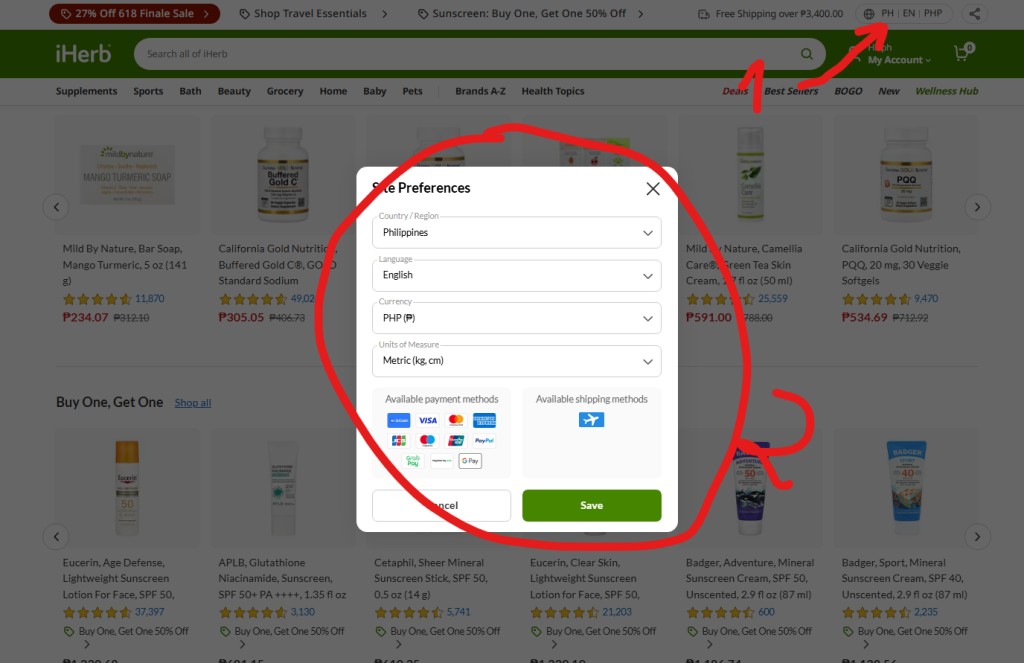
If you land on iherb.com by accident, look for the country flag icon at the top right of the page. Click it and select Philippines. The URL should change to start with ‘ph.iherb.com’ before you continue.
Step 2: Create Your iHerb Account
You can browse iHerb without an account, but you need one to place orders. Account creation takes 2 minutes:
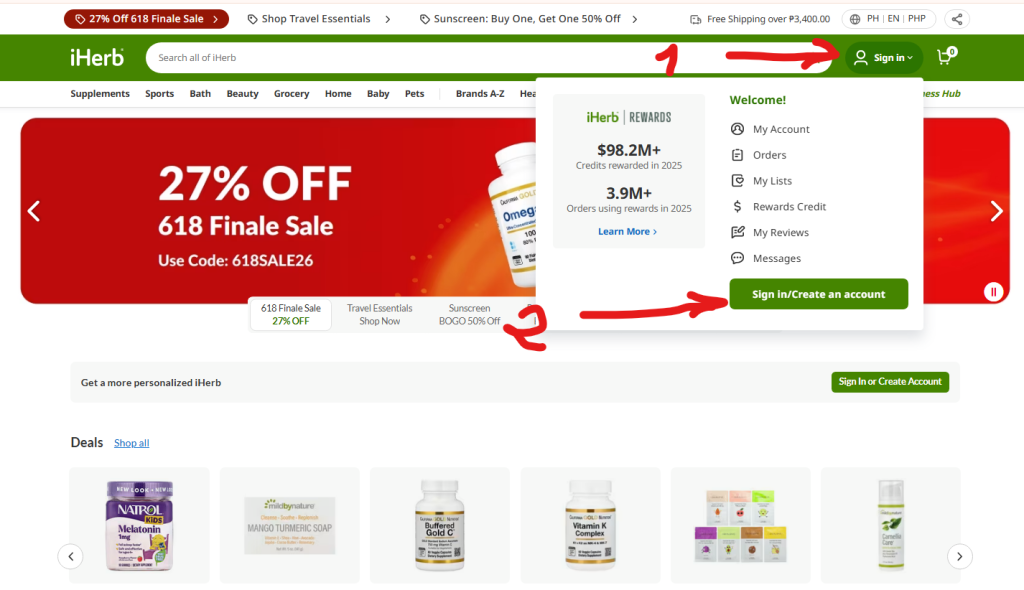
- Click the ‘Account’ or person icon at the top right of ph.iherb.com
- Select ‘Create Account’ (not ‘Sign In’)
- Enter your email address – use one you check regularly (order confirmations, tracking)
- Create a strong password (12+ characters with mix of letters, numbers, symbols)
- Optionally enter referral code BBS5750 for welcome discount
- Accept Terms of Service and Privacy Policy
- Click ‘Create Account’ – you may need to verify your email by clicking a link iHerb sends
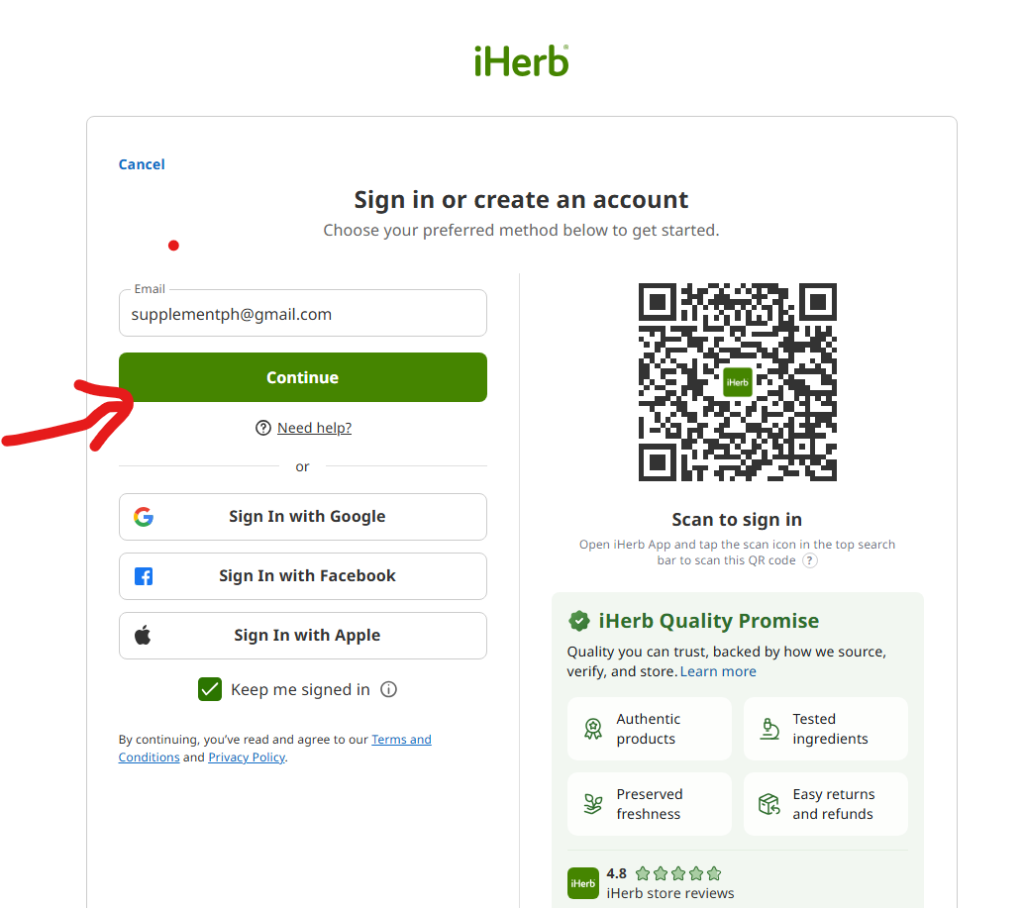
Apply welcome code during account creation
iHerb offers a welcome discount for new customers. If you have a referral code from a friend, a SupplementPH affiliate code, or an BSS5750 code, enter it during account creation OR at checkout. The discount typically applies as a percentage off your first order subtotal. Some welcome codes also unlock free shipping below the standard threshold.
Save these credentials: Your email and password give you access to order history, tracking, loyalty rewards, and reorder buttons for repeat purchases. Many Filipinos use iHerb monthly – your account becomes a long-term asset, not just a one-time login.
Step 3: Browse and Add Products to Your Cart
Once logged in, you can start shopping. iHerb has over 1,800 brands and 30,000+ products – more than any Philippine pharmacy. Here are the four most effective ways to find what you need:
Method 1: Use the search bar (fastest)
The search bar at the top of every page accepts product names, brand names, ingredients, or health categories. Examples that work well:
- ‘collagen powder’ – shows all collagen products across brands
- ‘doctor’s best magnesium’ – filters to specific brand and ingredient
- ‘vitamin C 1000mg’ – finds specific dose
- ‘CosRx snail mucin’ – finds K-beauty bestseller
Method 2: Browse category navigation
Hover over the menu items at the top: Vitamins, Herbs and Homeopathy, Sports, Beauty, Bath and Personal Care, Grocery, Babies and Kids, Pets, Healthy Home. Each opens sub-categories that narrow down to specific product types. This works well when you’re not sure what you want and want to explore.
Method 3: Check bestsellers and curated lists
Browse iHerb Bestsellers (popular Philippine choices) >>
Bestsellers are vetted by customer purchase volume – if 50,000+ Filipinos bought a product and gave it 4.7/5 stars, you can trust it’s quality. Sort filters let you narrow by category.
Method 4: Browse current sales and promotions
View current iHerb sales and offers >>
View Trial Offers (try new products at reduced price) >>
Brand of the Week rotates Mondays with 20%+ off a featured brand. Trial Offers let you try new products at reduced prices. Specials section has rotating discounts of 30-50% on various items. Strategic sale shopping can save you significant money on your first order.
Reading a product page (critical skill)
When you click a product, you see its detail page. Check these elements before adding to cart:
- Customer rating (aim for 4.5+ stars with 1,000+ reviews)
- Number of reviews (more reviews = more reliable rating)
- iTested logo or third-party certification badges (NSF, USP, ConsumerLab)
- ‘Supplement Facts’ or ingredient list – matches what you want to take
- Serving size and total servings per container
- Expiration date displayed (aim for 12+ months remaining)
- Price in Philippine Pesos
- ‘In stock’ indicator (not ‘Backordered’ or ‘Out of Stock’)
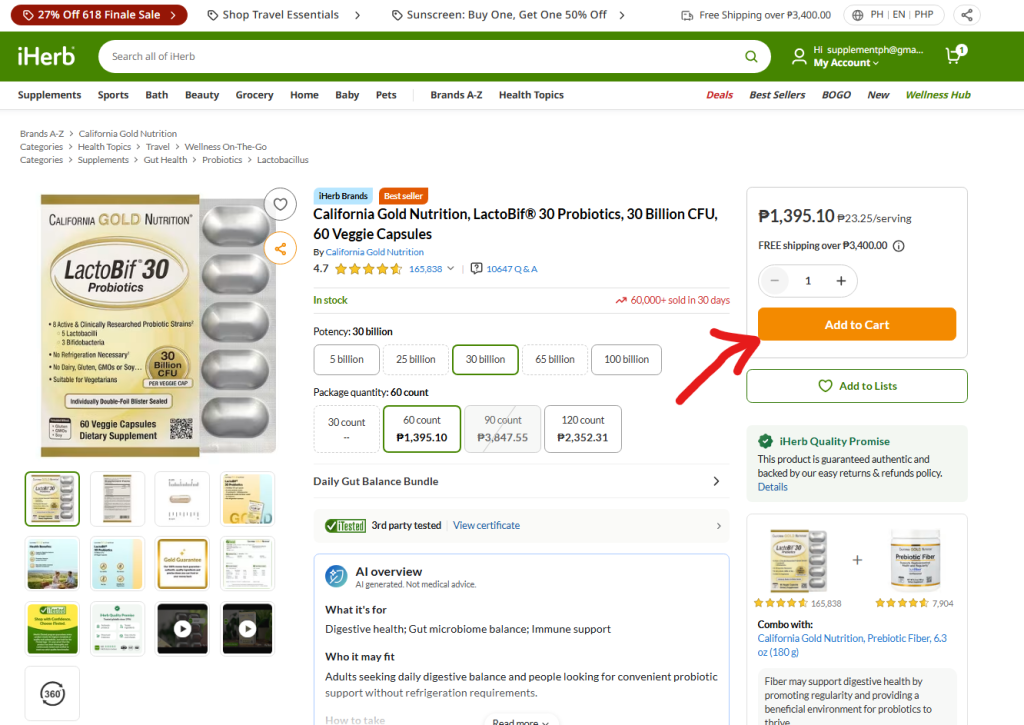
Add items by clicking ‘Add to Cart‘. The cart icon at top right shows your running total. Continue browsing and adding until you reach your target cart value.
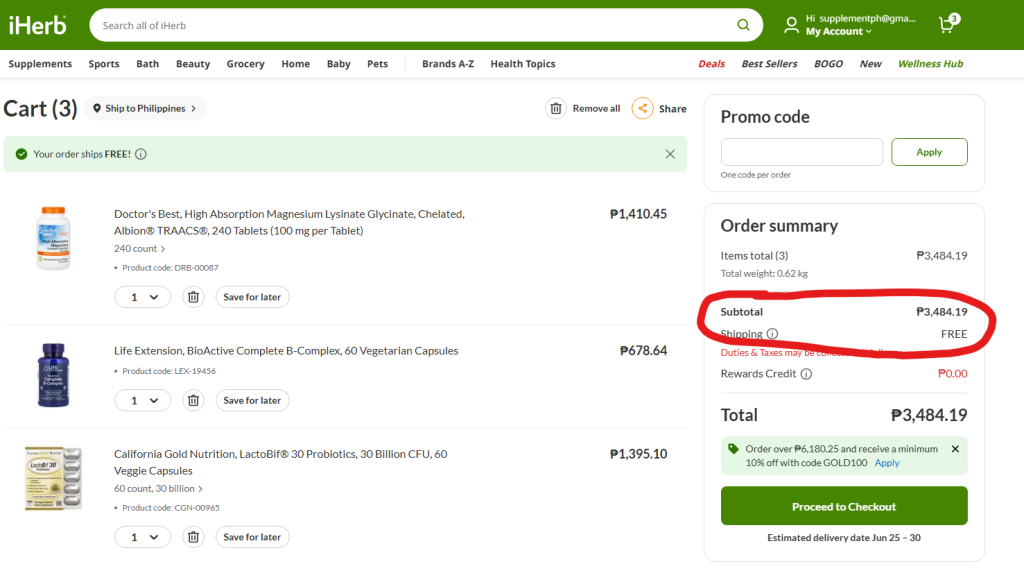
Step 4: Aim for the ₱3,400 Free Shipping Threshold
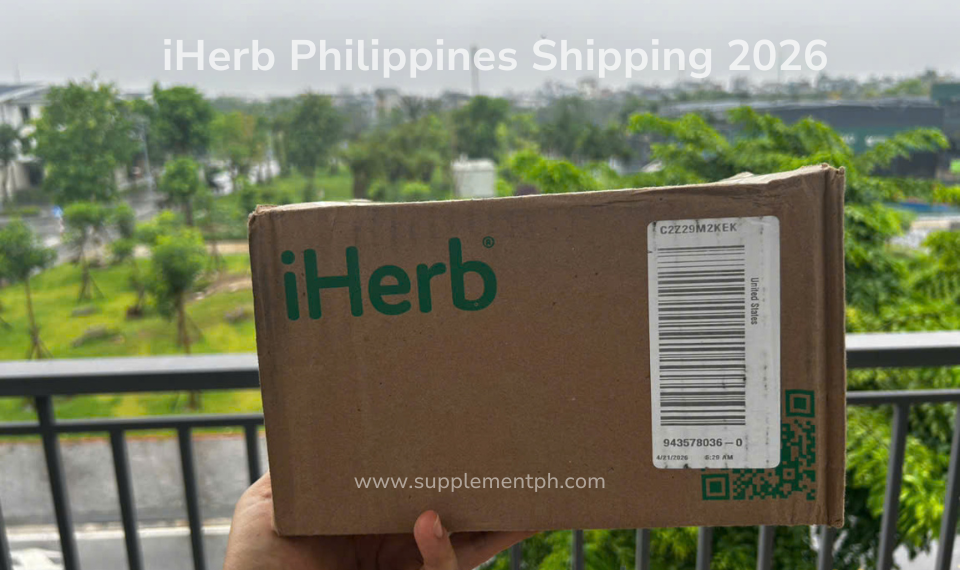
iHerb offers free shipping to Philippines on orders above ₱3,400 (verified June 2026 – threshold may change). This is the single biggest savings opportunity for first-time buyers. A typical iHerb order pays ₱350-600 in shipping; hitting the threshold eliminates this entirely.
Strategy: build cart strategically
- Identify your core need (e.g., monthly vitamins): ~₱1,500-2,000
- Add 1-2 sale items at 30-50% off to bridge: ~₱800-1,200
- Add 1 trial offer at reduced price to round up: ~₱500
- Total ~₱3,400-4,000 hits threshold with buffer
Why aim ABOVE ₱3,400 by ~₱500-1,000: occasionally items in your cart go out of stock between checkout and order processing. iHerb won’t partially fulfill – they need ALL items available. Having buffer means if 1 item is unavailable, you still cross the free shipping threshold with what remains.
Stay UNDER USD 170 for customs-free import
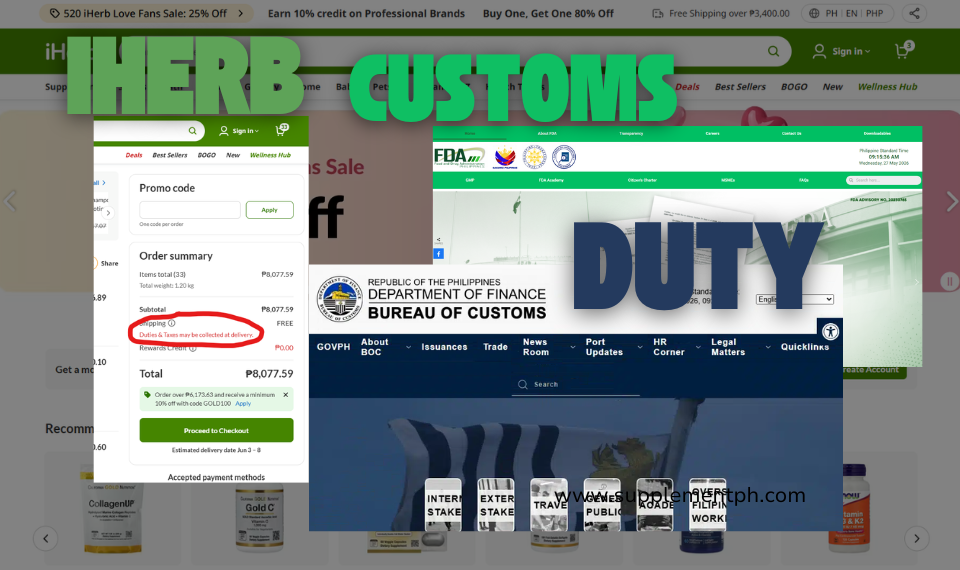
While maximizing free shipping value, also stay under the Philippine de minimis customs threshold of USD 170 (approximately ₱9,800 at 2026 exchange rates). Orders below this don’t trigger customs duties or VAT. The sweet spot for first orders: ₱3,500 to ₱8,000.
Step 5: Choose Your Shipping Method
iHerb shows shipping options at checkout. Philippine buyers typically see 2-3 options:
| Shipping Method | Cost | Speed | Carrier |
| Global Air with Tracking | FREE above ₱3,400 / ~₱350-600 below | 7-14 business days | Ninja Van or SF Express |
| DHL Express | ₱1,500-2,500 | 3-7 business days | DHL Philippines |
| Standard (rare) | ₱200-400 | 10-18 business days | Various |
For 95% of first-time buyers, Global Air with Tracking is the right choice. It’s the standard method, has reliable tracking, and works with Philippine local carriers. DHL Express is only worth the premium if you need supplements urgently for travel or medical reasons.
Step 6: Enter Your Delivery Address
Philippine addresses can be tricky for international systems. Format your address carefully:
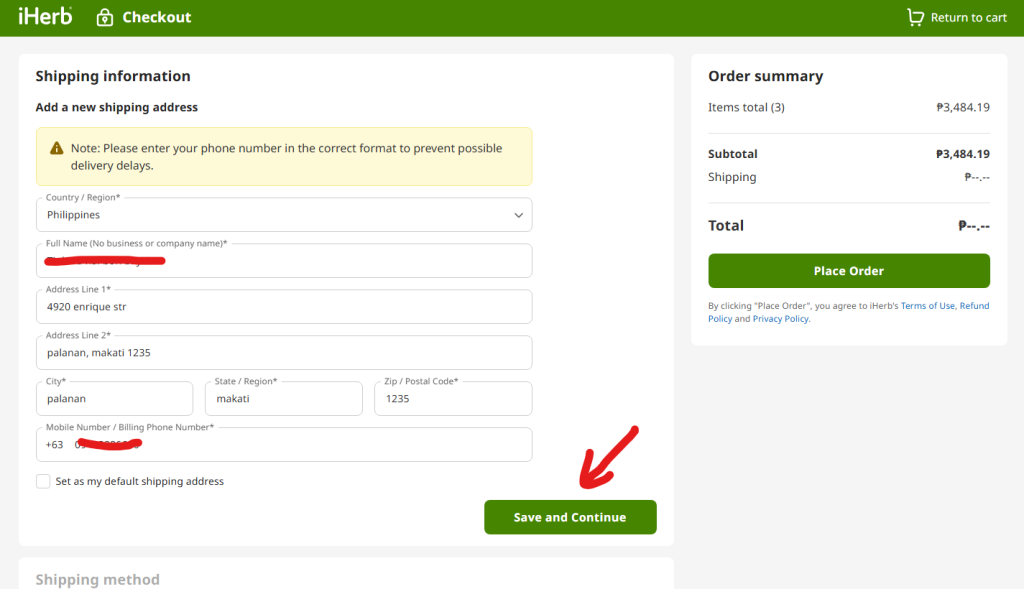
Required fields
- First Name + Last Name (as on government ID)
- Country: Philippines
- Address Line 1: Unit/House number + Street name
- Address Line 2: Subdivision/Village/Building name (if applicable)
- City: Use the official city name (e.g., ‘Makati’ not ‘BGC’)
- Province/State: Select Metro Manila, Cebu, etc.
- ZIP/Postal Code: Required (search ‘Philippine ZIP code [your city]’ if unknown)
- Phone Number: Active mobile number with country code +63
Tips for accurate delivery
- Use Roman alphabet only (no special Filipino characters)
- Include landmarks for rural addresses: ‘beside Iglesia Ni Cristo’ helps couriers
- Specify gate code or floor number for condos and gated communities
- Phone number must be active – couriers call to coordinate delivery
- Office addresses: include company name and floor
Address validation: iHerb may flag unusual address formats. If their system can’t verify your address, contact customer service via live chat – they can manually approve it. This is common for provincial addresses outside Metro Manila.
Step 7: Choose Your Payment Method
iHerb accepts multiple payment methods for Philippine customers. Each has trade-offs:
Payment options ranked for Filipinos
| Method | Best For | Pros | Cons |
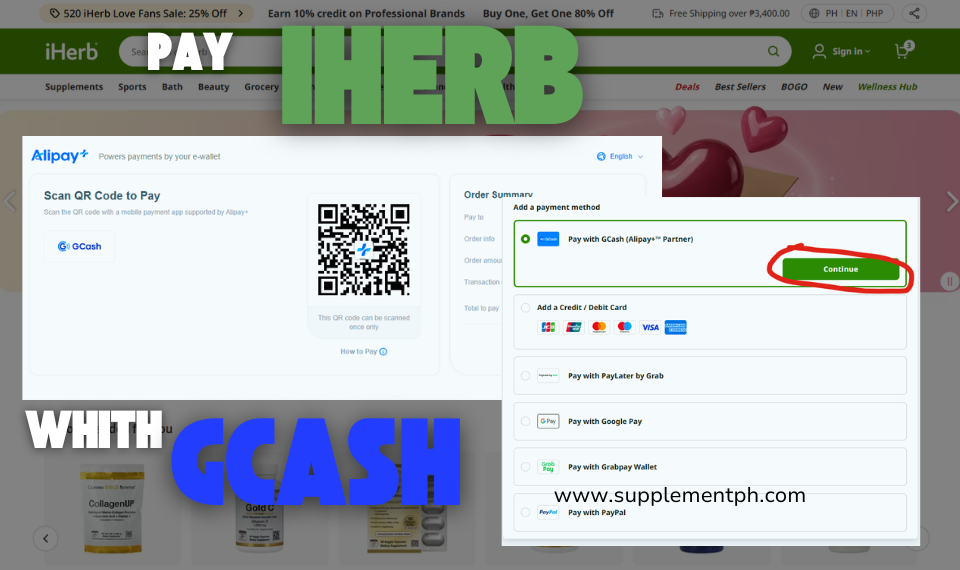
| GCash (via Alipay+) | Most Filipinos, no credit card needed | Easy, fast, familiar | Sometimes payment issues require retry |
| BPI/BDO Credit Card | First-time buyers, big orders | Chargeback protection, easy refunds | Foreign transaction fees may apply |
| Debit Card (Visa/MC) | Those without credit cards | Direct from bank account | Same FX fees as credit, weaker dispute |
| PayPal | Those with USD PayPal balance | Buyer protection program | Need PayPal account setup first |
| Apple Pay / Google Pay | Mobile-first shoppers | Fingerprint/face authentication | Linked card determines real method |
Recommended for first order: BPI/BDO credit card
For your very first iHerb purchase, we recommend using a Philippine credit card (BPI, BDO, Metrobank, RCBC, etc.). Why:
- Strongest fraud protection – chargeback if anything goes wrong
- Easier refund processing if you need to return
- Establishes purchase history with iHerb
- Earns credit card rewards/points on the transaction
After 2-3 successful orders, switch to GCash for convenience. GCash is faster but has fewer dispute mechanisms if problems arise.
Paying with GCash via Alipay+
GCash integration uses Alipay+ Partner technology. At checkout, select ‘Alipay+’ or ‘GCash’ from payment options. A QR code or redirect appears – scan with your GCash app or follow the redirect. Approve the transaction with your GCash MPIN. The payment posts immediately.
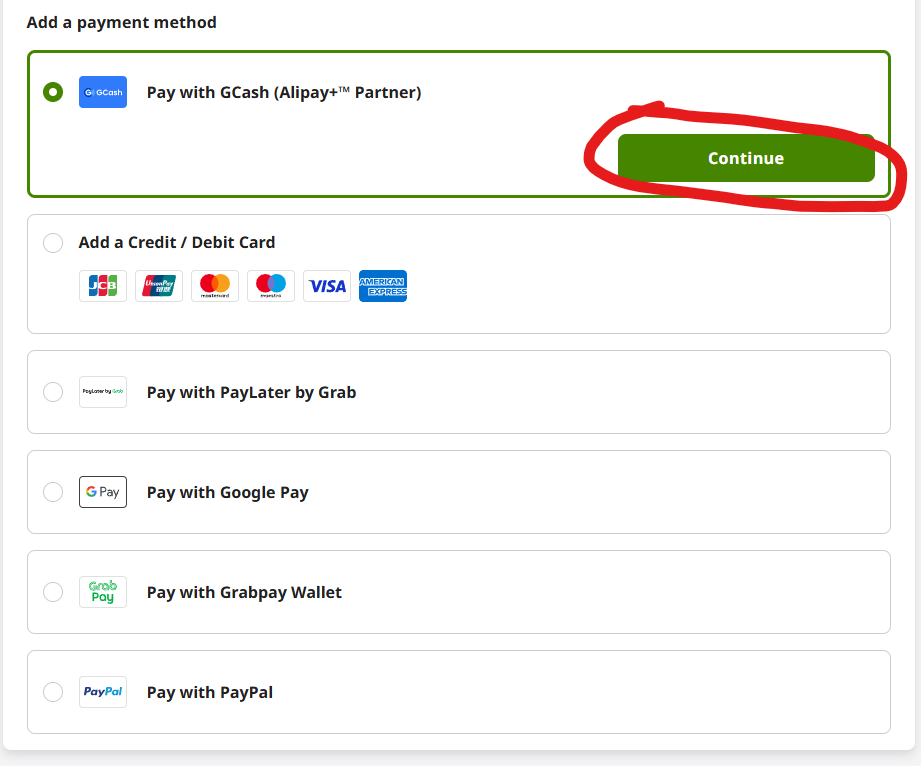
See our complete How to Pay iHerb with GCash guide for step-by-step screenshots and troubleshooting tips.
Step 8: Apply Discount Codes for Maximum Savings
Before clicking ‘Place Order,’ make sure you’ve stacked all available discounts. The promo code field appears in your cart or at the final checkout step.
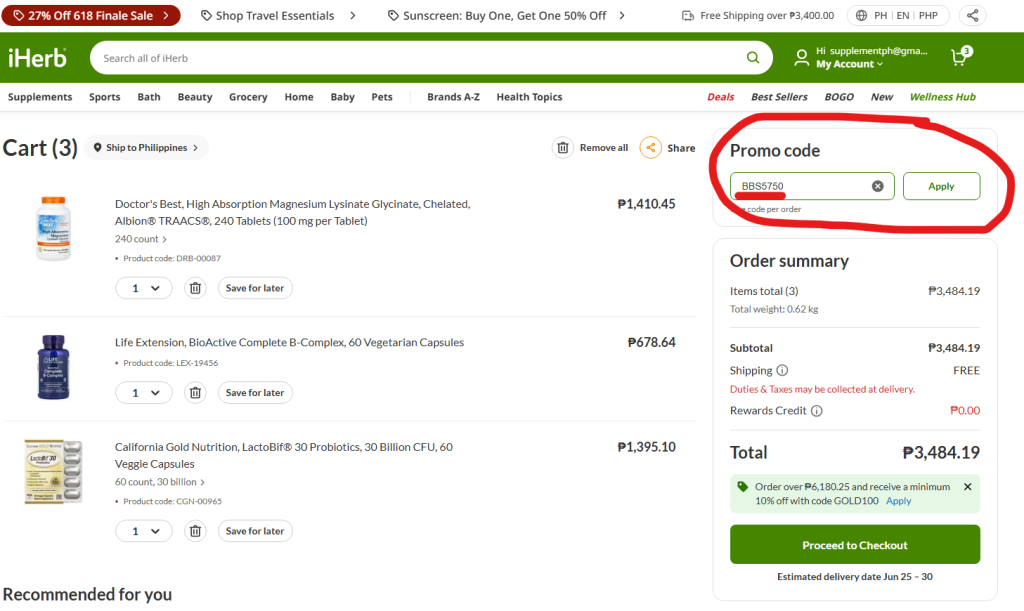
Discount stacking strategy
- Apply welcome code BBS5750 for new customer discount (5-10% off)
- Sale prices already applied automatically (Specials, Brand of the Week, Trial Offers)
- Free shipping kicks in at ₱3,400 cart subtotal
- iHerb Pesos (5% Loyalty Credit) earns on this purchase for next order
Where to find current sales programs
Current iHerb sales programs and codes >>
iHerb runs 10+ overlapping promotions at any time. Always check the sales page before checkout – you may discover Brand of the Week applies to items already in your cart, or that Daily Deals offer additional discounts you missed while browsing.


Step 9: Review and Confirm Your Order
The final checkout page shows your complete order summary. Take 60 seconds to verify everything before clicking ‘Place Order’:
Final review checklist
- All product names and quantities match what you intended to buy
- Delivery address is complete and correct (no typos)
- Phone number is accurate (couriers depend on this)
- Shipping method is Global Air with Tracking (or your chosen option)
- Free shipping is applied (if you’re above ₱3,400)
- Welcome code discount appears in price breakdown
- Subtotal + shipping + tax = correct final total
- Payment method shown matches what you intended
- Currency is PHP (not USD)
Click ‘Place Order’
After clicking, you may be redirected to your payment provider (GCash app, bank 3D Secure page, PayPal login). Complete authentication. You’ll return to an iHerb confirmation page showing your order number.
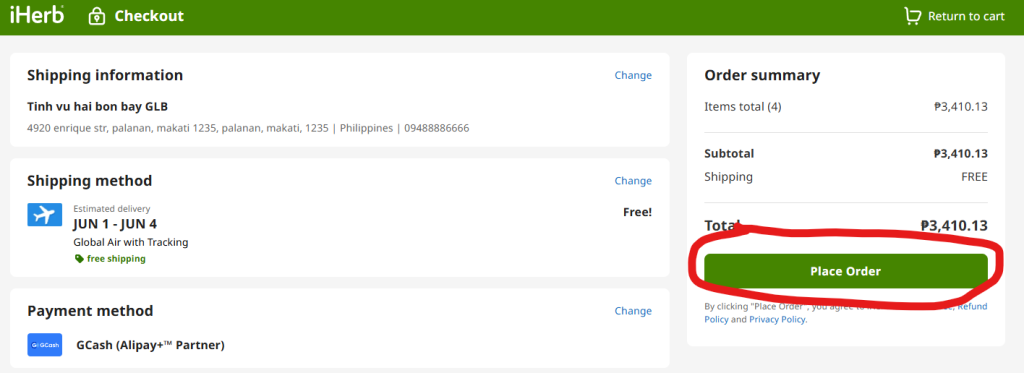
SAVE your order number! Take a screenshot of the confirmation page or save the email iHerb sends. You’ll need this number for any customer service inquiries, tracking issues, or returns.
Step 10: Track Your Package to Delivery
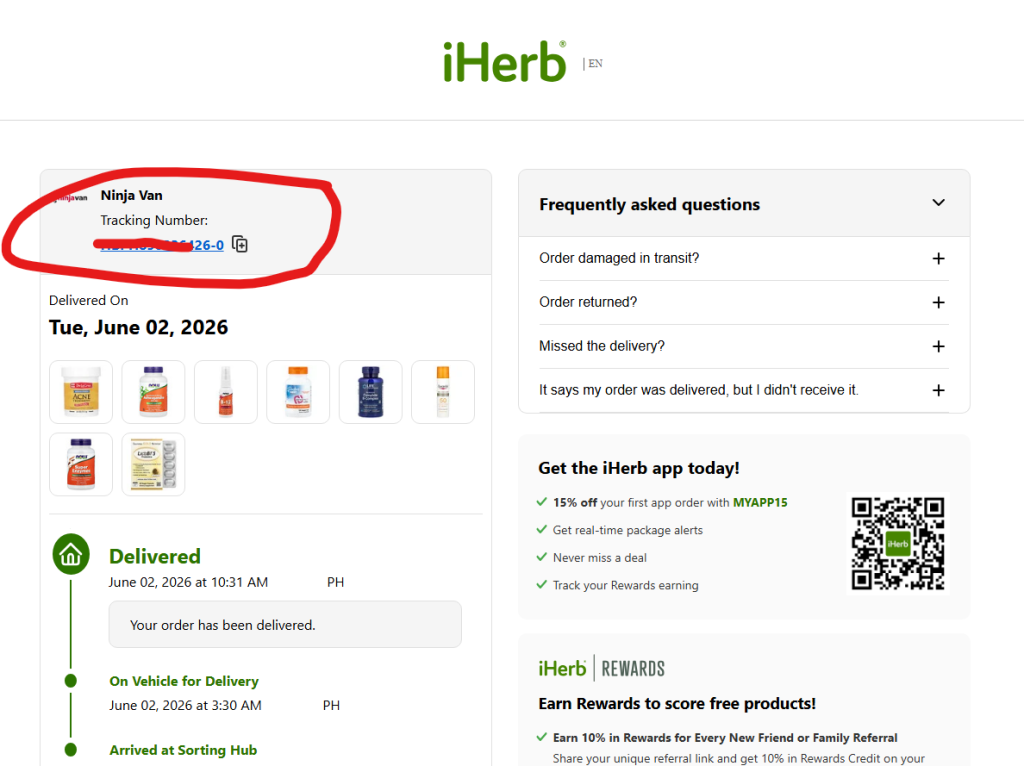
iHerb processes your order within 24-48 hours and ships from the nearest warehouse (usually South Korea for Philippine orders). You’ll receive multiple notifications:
Tracking notification timeline
| Stage | Timing | What You’ll See |
| Order confirmation | Immediate (email) | Order number, items, total |
| Order processing | 24-48 hours | Items picked from warehouse |
| Shipped from warehouse | 2-3 days after order | Tracking number issued |
| In transit (international) | 3-7 days | Package en route to Philippines |
| Customs processing | 1-3 days | Local entry into Philippines |
| Local carrier handoff | 1 day | Ninja Van or SF Express takes over |
| Out for delivery | Same day as arrival | Courier en route to you |
| Delivered | 7-14 days total | Signature or proof of delivery |
How to track
- Check email for tracking number (subject: ‘Your iHerb order has shipped’)
- Log into ph.iherb.com > Account > Order History
- Click your order > view tracking number
- Once shipped to Philippines, also track at Ninja Van Philippines or SF Express site
- Install iHerb mobile app for push notifications at each milestone
What to Expect After Ordering
Day 1-2: Order confirmation and processing
Your order shows ‘Processing’ status. iHerb picks items from warehouse, packages them, and prepares shipment. You’ll receive email when items ship.
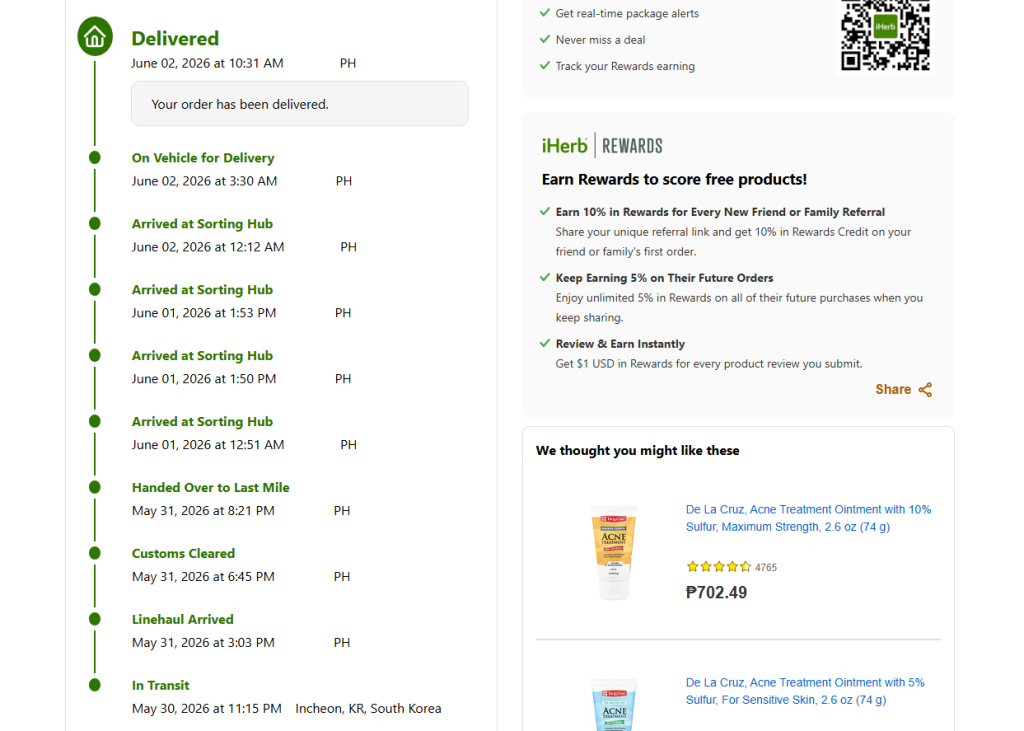
Day 3-7: International transit
Package leaves iHerb warehouse and enters international shipping. Tracking may show ‘In Transit’ with location updates. Some carriers don’t update until package arrives in Philippines – don’t panic if tracking is silent for a day or two.
Day 7-9: Customs processing in Philippines
Package arrives in Philippines (usually Manila). Customs scans the package. For orders under USD 170, this typically passes through without duty assessment. For orders over the threshold, you may receive a notification to pay duties before delivery.
Day 9-14: Local delivery
Local carrier (Ninja Van or SF Express) takes possession and delivers to your address. They may call your phone to coordinate delivery time. If you’re not home, they typically attempt redelivery 1-2 more times or hold the package at a pickup point.
Troubleshooting Common First-Order Issues
Payment declined
Most common cause: bank flagged the foreign transaction as suspicious. Solutions:
- Contact your bank to whitelist iHerb (international supplement retailer)
- Try a different payment method (GCash if card declined, or vice versa)
- Reduce order total – some banks flag transactions over PHP 5,000
- Wait 24 hours and retry (some declines clear automatically)
Address validation error
iHerb’s system flags an unusual address. Solutions:
- Double-check ZIP code is correct for your barangay
- Try simpler address format (Street + City + Province + ZIP only)
- Contact iHerb live chat to manually approve
- Use an alternate verified address (workplace, family member)
Package delayed beyond 14 days
First check tracking. If package is in customs, that’s normal and may take additional days. If package shows ‘Delivered’ but you didn’t receive it, contact local carrier first. If tracking shows no movement for 7+ days, contact iHerb customer service – they handle disputes with carriers.
Customs hold or duty notification
If your order exceeds USD 170 or contains items customs wants to verify, you may receive a notification. Pay the assessed duties (typically minimal for personal use) and the package releases. If you believe the assessment is incorrect, you can dispute through Bureau of Customs procedures (rarely worthwhile for small amounts).
Missing or damaged items
Open your package on receipt and verify all items present and undamaged. If issues:
- Photograph the package and damaged/missing items immediately
- Contact iHerb customer service within 7 days of delivery
- Live chat is fastest, email also works
- Provide order number and photos of issue
- Resolution typically within 24-48 hours (replacement, refund, or partial credit)
Money-Saving Tips for Future Orders
Build a monthly rhythm
Most successful iHerb shoppers order monthly with a planned cart. They maintain a wishlist throughout the month, then place one consolidated order around payday. This rhythm:
- Always hits free shipping threshold (saves ₱350-600 per order)
- Catches Brand of the Week rotation in their favor
- Maximizes iHerb Pesos (5% loyalty credit) compounding
- Reduces decision fatigue (one shopping session vs many)
Time orders around sales
Check current iHerb sales before ordering >>
Monday: New Brand of the Week launches. If a brand you use rotates in, time your order. Trial Offers and Specials rotate continuously – check the sales page before any order.
Use loyalty credits
Every order earns 5% iHerb Pesos (Loyalty Credit). These automatically apply to your next order’s discount section. A ₱5,000 order earns ₱250 in credits for future use. Don’t forget to apply them at checkout – the system shows but doesn’t auto-apply.
Recommended First Order Examples
Conservative starter (₱3,500-4,500)
- California Gold Nutrition Vitamin D3 5000 IU (iTested) – ~₱600
- Doctor’s Best Magnesium with Albion (240ct) – ₱1,410.45
- Doctor’s Best Vitamin K2 MK-7 (60ct) – ₱876.61
- Doctor’s Best CoQ10 with BioPerine 60ct – ₱1,317.95
- TOTAL approximately ₱4,205 – hits free shipping with buffer
K-Beauty starter (₱3,500-4,000)
- CosRx Advanced Snail 96 Mucin Power Essence – ~₱950
- APLB Glutathione Niacinamide Sunscreen – ~₱700
- SOME BY MI Miracle Starter Kit – ~₱1,200
- Beauty of Joseon Glow Serum – ~₱600
- TOTAL approximately ₱3,450 – hits free shipping
Family vitamins (₱4,000-5,000)
- California Gold Nutrition Multivitamin Adults – ~₱700
- California Gold Nutrition Children’s Multivitamin – ~₱500
- Now Foods Vitamin C 1000mg – ~₱650
- California Gold Nutrition Omega-3 – ~₱650
- Doctor’s Best Vitamin D3 5000 IU 720ct – ₱1,395.81
- TOTAL approximately ₱3,900 – hits free shipping
Frequently Asked Questions
How long does iHerb shipping take to Philippines?
Global Air with Tracking: 7-14 business days for most Philippine addresses. Metro Manila and Cebu often receive in 5-9 days. Remote provinces (Mindanao, island provinces) may take up to 18 days. DHL Express: 3-7 days for additional ₱1,500-2,500 cost.
Is there cash on delivery (COD) on iHerb?
No, iHerb does not offer cash on delivery in the Philippines. They are an international retailer requiring payment before shipping. Closest alternative is GCash which has cash-like convenience. See our separate guide on iHerb payment options.
Can I pick up at a Ninja Van location?
By default, iHerb shipments are home delivery. However, after the package arrives in Philippines, you can coordinate with Ninja Van customer service to redirect to a pickup point at 7-Eleven, Cebuana Lhuillier, or M Lhuillier. See our Ninja Van Philippines guide for step-by-step instructions.
Will I have to pay customs duties?
For orders under USD 170 (approximately ₱9,800) for personal use, customs duties typically do not apply under Philippine de minimis rules. Larger orders may face duties. See our Customs and Duty Guide for complete rules and thresholds.
Is iHerb safe to order from?
Yes. iHerb has been operating since 1996 with BBB A+ rating, 5.8M+ store reviews averaging 4.8/5, GMP/ISO/NSF-certified warehousing, and their proprietary iTested independent third-party testing program. See our Is iHerb FDA Approved article for complete quality assurance details.
What if I receive the wrong product?
Contact iHerb customer service within 7 days of delivery with photos. iHerb offers refund or replacement under their 60-day return policy. Resolution typically within 24-48 hours.
Do I need to declare iHerb purchases on income tax?
Personal use purchases for your own consumption are not subject to additional income tax reporting. Consult a Filipino tax professional if you have unusual situations (reselling, very large orders, etc.).
Can I share an iHerb order with friends to split shipping?
Technically yes, but practically risky. iHerb ships to one address per order. If you combine orders with friends, the recipient takes full delivery responsibility. Settlement between you is private. Better practice: have each person place their own order during the same week to minimize hassle.
What if iHerb is out of stock on an item after I order?
iHerb does NOT partially fulfill orders. If any item becomes unavailable between order and fulfillment, iHerb notifies you. You can: wait for restock, substitute with similar item, or cancel the unavailable item only. This is why ordering with ₱500-1,000 buffer above the free shipping threshold protects you – if 1 item is unavailable, you still ship free.
Final Pro Tips Before You Order
Save these tips: (1) Always use ph.iherb.com not iherb.com. (2) Aim ₱500-1,000 above ₱3,400 for free shipping buffer. (3) First order: use credit card for chargeback protection. (4) Apply welcome code BBS5750 for additional discount. (5) Keep order number for customer service inquiries. (6) Track via both iHerb account AND Ninja Van Philippines site. (7) Inspect package immediately on delivery – 7-day window for issue reports.
Ready to Place Your First iHerb Order?
Now that you understand the complete process, head to ph.iherb.com and start building your first cart. Use code BBS5750 at checkout for your welcome discount, aim for the ₱3,400 free shipping threshold, pay with credit card or GCash, and watch for delivery within 7-14 business days. Welcome to international supplement shopping made simple.
Related Guides for Filipino iHerb Buyers
- iHerb Philippines Shipping Guide – detailed shipping methods and rates
- How to Pay iHerb with GCash – step-by-step GCash payment
- iHerb Customs and Duty Guide Philippines – import limits and rules
- iHerb Ninja Van Philippines – tracking and pickup options
- Is iHerb FDA Approved? – safety and quality verification
- Best iHerb Products for Filipinos 2026 – what to buy first
- Best K-Beauty on iHerb Philippines – skincare focused guide
- iHerb Promo Code Philippines – current sales programs
Editorial Disclosure: This guide provides general consumer education on the iHerb checkout process for Filipino buyers. Information verified from ph.iherb.com as of June 2026 – actual interface, fees, and policies may change. Free shipping threshold of ₱3,400 confirmed from iHerb’s official Philippine shipping page. SupplementPH participates in iHerb’s affiliate program through Involve Asia, meaning we may earn commission on purchases made through links in this article at no cost to you. Commission does not influence editorial assessment. See our Affiliate Disclosure page for full transparency.